As businesses grow, using a singular cloud provider has been the rare case rather than the norm. The combination of AWS, Microsoft Azure, and GCP allows companies to benefit from cost optimizations, improved performance, and vendor independence.
However, managing multiple clouds comes at a great cost fragmentation in security management.
Without a holistic approach, security professionals will have to deal with dozens of dashboards, miss crucial alerts, and open opportunities for attacks to slip through. It is important to understand how a Managed Security Operations Center Managed SOC works.
What Makes Multi-Cloud Security So Complex?
The conventional network security system had clear-cut perimeters wherein the firewalls ensured protection of a centrally located data center. With the advent of multi-clouds, we do not have any clear perimeters now.
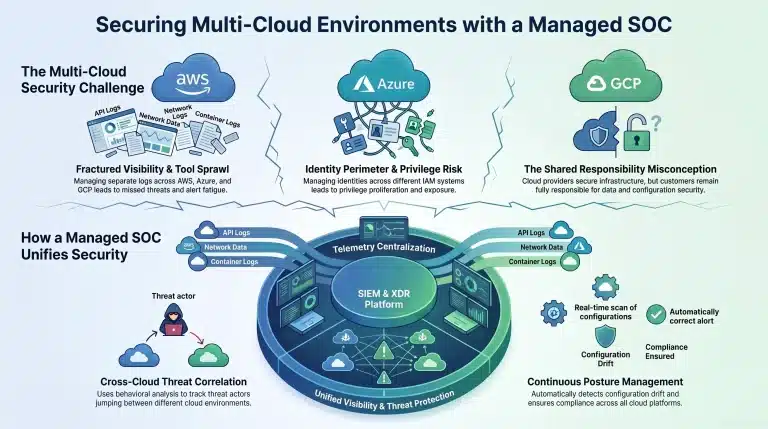
- Fractured Visibility: We have AWS CloudTrail, Azure Monitor, and GCP Cloud Logging, all with different languages. Due to the dispersion of security events in fragmented systems, it is very hard to trace a particular threat actor who jumps from one cloud to another.
- The Identity Perimeter: The new perimeter in the cloud environment is based on identity. The management of identities, API keys, and permissions across different IAM systems results in privilege proliferation.
- The Shared Responsibility Misconception: Cloud service providers protect the infrastructure, but the companies are fully responsible for protecting their own data, access configurations, and workload protection. Even a misconfigured S3 bucket or open storage containers could make confidential data vulnerable despite all security that the underlying provider has in place
- Tool Sprawl & Alert Fatigue: Cloud security solutions often include more than 10 different tools. Jumping from one console to another is cumbersome and results in IOCs being overlooked.
How a Managed SOC Unifies Multi-Cloud Monitoring
Managed SOC is the central command post where telemetry data, threat intelligence, and 24/7 human analysts’ operations come together.
Telemetry Centralization – Rather than manually going through multiple cloud consoles, API logs, control plane activity, network and container events are all directed to one Security Information and Event Management (SIEM) or Extended Detection and Response (XDR) platform instead of analyzing each cloud console separately.
Cross-Cloud Threat Correlation – The adversary is not likely to remain in one location only. The attacker may compromise an access token on Azure to gain entry into an AWS database. The Managed SOC takes care of this using behavioral analysis.
Continuous Posture Management – Network monitoring alone is not enough. Configuration monitoring must be done as well. Managed SOC process incorporates CSPM for automatic detection of drift, configuration non-compliance (CIS benchmark, SOC 2, etc.), and exposure in multi-cloud environments.
In-House SOC vs. Managed SOC for Multi-Cloud
Multi-cloud environment security requires more than just platform-based monitoring solutions. Although an in-house SOC is usually challenged by its inability to achieve proper visibility, detect and correlate threats as well as perform security operations in several cloud environments at once, Managed SOC provides all these services in a centralized manner via its integrated security framework. As a result, it is possible to minimize blind spots and address any threats faster. In case you want to compare capabilities, costs and operational specifics of these two approaches, feel free to read our comparison article Managed SOC vs. In-House SOC: Which One to Choose?
Baseline Steps for Effective Multi-Cloud Monitoring
The following foundational steps should be considered in order to establish a resilient baseline for cloud security:
- Zero Trust & Identity Hygiene Implementation: Employ MFA (multi-factor authentication) and least-privilege access controls for all cloud IAM systems.
- Monitor Control Planes: The network flow log is unable to detect management-level modifications that are essential. Collect control plane audit logs for tracking role changes, resource allocation, and administrative API calls.
- Security Policy Standardization: Establish security standards on all environments and not create separate policies for each provider.
- Automate Initial Containment: Take advantage of automation orchestration (SOAR) to revoke compromised credentials or isolate infected containers.
Secure Your Multi-Cloud Future with IBN Technologies
The advantage of multi-clouds is tremendous flexibility, yet, at the same time, the security should not be ignored. Through unification of telemetry, standardization of posture controls, and utilizing the 24/7 detection capabilities, it is possible to enjoy the flexibility of the multi-cloud architecture while retaining visibility and control.
Managing multi-cloud threat detection can be very complex and require specific knowledge and attention. At IBN Technologies, we offer Managed SOC services to organizations that are based on multi-cloud environments. We offer continuous monitoring, threat hunting, and incident response automation in our offering.
Focus on growing your business while IBN Technologies handles your 24/7 multi-cloud threat monitoring. Speak with Our Experts!
Need Managed SOC and SIEM Services for your 2026 project?
Get a free consultation with our tech team — no commitment.
Frequently Asked Questions
Managed SOC is an external 24/7 team of cybersecurity professionals who consolidate the threat intelligence, detection, and incident response from AWS, Azure, GCP, and on-premises environments into one place.
Multi-cloud security monitoring is hard because of fragmented native solutions, diverse log files format, permission sprawl in several IAM engines, and absence of visibility between clouds.
Cloud providers take care about their infrastructure security, but you still stay fully responsible for your data, configuration, access rights, and application workloads.
Applying behavioral analysis, Managed SOC correlates cross-cloud threats, like an attempt to use Azure credentials to access an AWS database.